
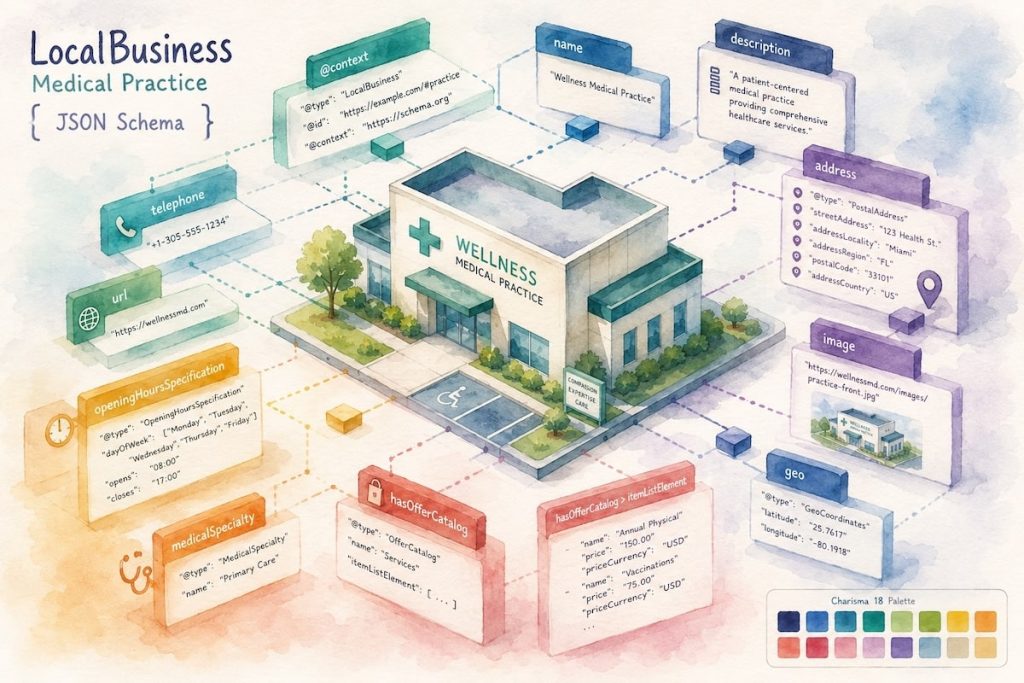
If Google can’t parse what your business is, where it is, and when it’s open, it can’t show that information in search results — no matter how clearly it’s written on your page for humans. That’s what LocalBusiness schema fixes. It’s a block of structured data that tells Google, in a format it reads directly, the facts about your business: name, address, hours, phone number, price range.
This post covers what the schema needs, which fields actually matter, and how to generate a working version with AI in a few minutes — including a prompt you can copy, paste, and fill in with your own business details.
What LocalBusiness Schema Actually Does
Search engines can guess at a lot from body copy, but guessing is unreliable. Structured data removes the guesswork. You add a script to your page that spells out your business info in a standardized format (JSON-LD), and Google reads it directly instead of inferring it from your “About” page.
Get it right and your business becomes eligible for:
- Knowledge panels — the info box that appears when someone searches your business name directly
- Local carousels — when someone searches a category (“best electricians near me”), businesses with clean structured data are more likely to surface with rich details attached
One thing to be clear about: schema is not a ranking factor by itself. It doesn’t move you up the results page. What it does is make your business eligible for richer display formats once you’re already ranking — and it gives Google cleaner data to work with, which matters more every year as AI-driven search features pull directly from structured data instead of crawling pages line by line.
The Required Fields (Don’t Publish Without These)
Google requires exactly two properties for LocalBusiness schema to be valid:
name— the business name, as textaddress— aPostalAddressobject with street address, city, state/region, postal code, and country
That’s the floor, not the target. A schema block with just these two fields will validate, but it won’t do much for you. The fields below are where the actual value is.
The Fields That Actually Move the Needle
Google marks these as “recommended,” which in practice means: include them, because they’re what both Google and your customers expect to see.
telephone— your primary contact number, written with country code and area code includedurl— the fully-qualified URL of that specific business location’s page. It has to be a working link, not a placeholderpriceRange— a relative indicator like$$or$10–15. Keep it under 100 characters. Google drops the field entirely if it runs longopeningHoursSpecification— your hours, broken out by day. This one has more nuance than it looks:
Standard hours (same schedule every week, no end date):
"openingHoursSpecification": [
  {
    "@type": "OpeningHoursSpecification",
    "dayOfWeek": ["Monday", "Tuesday", "Wednesday", "Thursday", "Friday"],
    "opens": "09:00",
    "closes": "21:00"
  },
  {
    "@type": "OpeningHoursSpecification",
    "dayOfWeek": ["Saturday", "Sunday"],
    "opens": "10:00",
    "closes": "23:00"
  }
]
Hours that cross midnight — define them as a single block rather than splitting across two days:
"openingHoursSpecification": {
  "@type": "OpeningHoursSpecification",
  "dayOfWeek": "Saturday",
  "opens": "18:00",
  "closes": "03:00"
}
Open 24 hours — set opens to "00:00" and closes to "23:59". Closed all day — set both to "00:00".
Seasonal closures — add validFrom and validThrough dates to mark a temporary closure (holiday shutdowns, for example) without touching your standard hours.
Beyond hours, round out the schema with:
geo— latitude and longitude, precise to at least 5 decimal placesaggregateRatingandreview— only add these if your site actually collects and displays reviews of the business. Never populate them with invented numbers. Google treats fabricated review data as a policy violation, and it’s an easy way to trigger a manual actionmenu— for restaurants and food establishments, a link to the actual menu page
Pick the Right @type — Not Just “LocalBusiness”
LocalBusiness is the parent type, but Google wants the most specific subtype available. A restaurant should use Restaurant. A spa should use DaySpa. A gym should use HealthClub. The more specific the type, the more Google understands about what you actually do.
A quick reference for common local business categories:
| Business type | Schema @type |
|---|---|
| Electrician, plumber, HVAC | Electrician, Plumber, HVACBusiness |
| Medical practice, clinic | MedicalBusiness or a more specific subtype |
| Dentist | Dentist |
| Law firm | LegalService |
| Restaurant, cafe | Restaurant, FoodEstablishment |
| Spa, salon | DaySpa, HairSalon |
| Gym, fitness studio | HealthClub, SportsActivityLocation |
| Real estate agency | RealEstateAgent |
| Auto repair | AutomotiveBusiness |
If a business genuinely offers multiple services — an electrician who also does locksmith work, for example — schema.org supports listing multiple types as an array:
"@type": ["Electrician", "Locksmith"]
Don’t try to use additionalType for this. Google doesn’t support it for LocalBusiness.
Multi-Location or Multi-Department Businesses
Each physical location gets its own complete LocalBusiness block, with its own address, phone number, and hours. Don’t try to combine multiple locations into a single schema object — Google needs one per address.
For a single location with internal departments (a department store with a pharmacy inside it, a gym with a juice bar), use the department property. Nest the department as its own object inside the parent, and only override the properties that differ — hours, phone number, name. Everything else inherits from the parent business.
Google’s naming convention: combine the store name with the department name, like Dave's Department Store and Dave's Pharmacy. If the department already has its own distinct brand — a Best Buy with a Geek Squad counter — use that name as-is instead of forcing the parent name into it.
Step-by-Step: Generate Your Schema With AI
You don’t need to hand-write JSON-LD. An AI model can produce a clean, valid block in seconds if you give it the right instructions and your actual business data. Here’s the process:
- Gather your info first. Business name, exact category (pick the closest schema type from the table above), full address, phone number with country code, website URL, hours for each day, and price range. Having this ready before you prompt saves you a round of back-and-forth.
- Copy the prompt below into Claude, ChatGPT, or any capable LLM.
- Replace every bracketed placeholder with your real business details.
- Check the output against the required and recommended fields above — don’t assume it’s correct just because it looks like valid JSON.
- Install it by pasting the script inside a
<script type="application/ld+json">tag in your page’s<head>. - Validate it live with Google’s Rich Results Test before you consider it done.
- Request a recrawl through Search Console once it’s published, and keep an eye on the Enhancements report for errors.
Copy-Paste Prompt
Generate valid JSON-LD structured data for a LocalBusiness, following Google's
LocalBusiness structured data guidelines and the schema.org/LocalBusiness spec.

Use this business information:

Business name: [BUSINESS NAME]
Most specific schema.org type: [e.g. Electrician, Restaurant, DaySpa, Dentist —
  use the most specific type available, not just "LocalBusiness"]
Street address: [STREET ADDRESS]
City: [CITY]
State/region: [STATE OR REGION]
Postal code: [POSTAL CODE]
Country: [COUNTRY, e.g. US]
Phone number (with country + area code): [PHONE NUMBER]
Website URL for this specific location: [URL]
Price range (e.g. $, $$, $$$, or a range like $10-$20): [PRICE RANGE]
Hours of operation (list each day and its open/close time, or "closed"):
[e.g. Mon-Fri 9:00-18:00, Sat 10:00-16:00, Sun closed]
Latitude and longitude (if known, to at least 5 decimal places): [OPTIONAL]

Rules:
- Output only the JSON-LD, inside a single <script type="application/ld+json"> tag.
- Include "name" and "address" as required fields.
- Include "telephone", "url", "priceRange", and "openingHoursSpecification" as recommended fields.
- Use the OpeningHoursSpecification format with dayOfWeek, opens, and closes for each distinct schedule block. Group consecutive days with identical hours into one block.
- Do not include "aggregateRating" or "review" unless I explicitly provide review data. Never invent ratings.
- Do not add any fields I have not provided data for.
- Do not include any explanation, commentary, or text outside the script tag.
Validate Before You Publish
Never ship schema without testing it. Run the page through Google’s Rich Results Test and confirm it comes back clean.
The most common errors worth checking for:
- Reused or invented ratings — pulling a generic “4.8 stars” into
aggregateRatingwithout real review data behind it - Missing country/area code on the phone number
priceRangeover 100 characters — Google silently drops the field instead of erroring, so this one’s easy to miss- Wrong or overly generic
@type— defaulting toLocalBusinesswhen a more specific type exists
Once the page is live and passing, submit your sitemap or request a recrawl through Search Console. Structured data changes can take several days to show up in results, so don’t panic if a knowledge panel doesn’t appear overnight.
FAQ
Does LocalBusiness schema guarantee a knowledge panel? No. It makes you eligible for one. Whether Google actually shows it depends on a mix of factors outside the schema itself, including your overall search presence.
Do I need aggregateRating if I don’t collect reviews? No — skip it. It’s explicitly listed as relevant only for sites that capture reviews of the business. Leaving it out is the correct move, not a missed opportunity.
Does every page need LocalBusiness schema, or just one? One canonical page for the business — usually your homepage or a dedicated location page — is enough. For multi-location businesses, each location’s own page should carry its own schema block.


